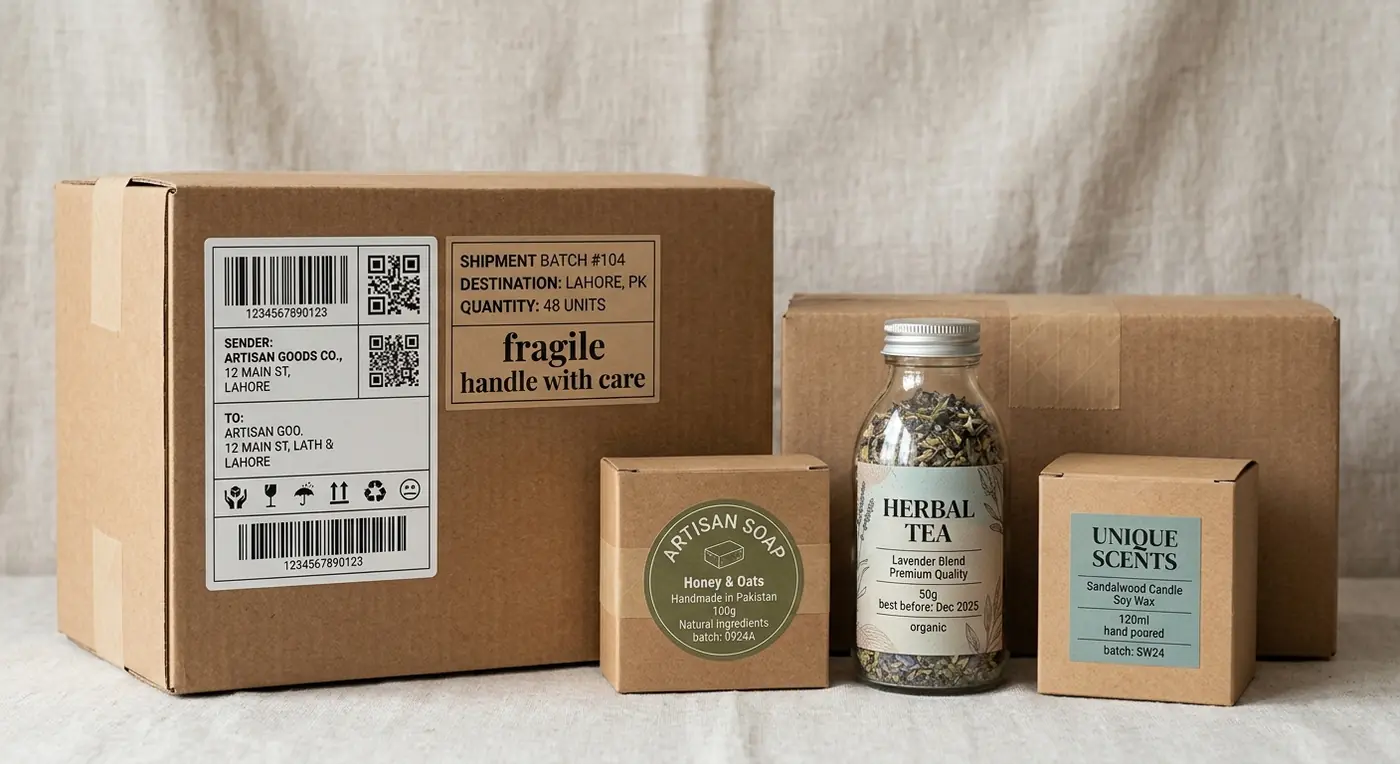
Packaging labels may look like a small part of a paperboard box, but they can carry a surprising amount of work. A label can identify a product, show ingredients, provide directions, display a barcode, carry business information or help a shipping carrier move a package from one location to another.
For small businesses in the USA, making packaging labels can be as simple as designing a product sticker and printing it on label sheets at home. A larger brand may work with a commercial label printer and order thousands of labels on rolls.
Product labels and shipping labels are different, though. Product labels support the item and its packaging, where shipping labels contain information used to deliver the parcel. Search research around this topic shows strong interest in both areas, including labels made at home, product labels and small business shipping labels. Pasted text
This guide covers how to make packaging labels, select label materials, create product labels, print them at home and prepare shipping labels for paperboard packaging.
What Are Packaging Labels?
A packaging label is printed information attached to a box, carton, jar, bag or another package.
The label might be decorative, informational, functional, or a mix of these jobs.
A paperboard cosmetic carton, for example, may already contain printed branding. A small company using blank stock cartons could apply a label containing the logo and product name instead.
Common packaging labels include:
- Product labels
- Logo stickers
- Barcode labels
- Ingredient labels
- Warning labels
- QR code labels
- Address labels
- Shipping labels
- Return labels
- Inventory labels
Labels give small businesses a way to personalize stock packaging without ordering completely custom printed cartons.
Product Labels vs Shipping Labels
Before creating anything, decide which type you need.
Product Labels
Product labels identify or describe the item being sold. They can contain a brand name, product name, quantity, ingredients, directions and other information.
These labels are part of the customer’s product experience.
Shipping Labels
Shipping labels are operational. They help USPS, UPS, FedEx and other carriers route packages.
A typical shipping label can contain sender and recipient information, service information, tracking data and machine readable codes.
Do not treat a shipping label as another decorative sticker. Carrier generated labels need to remain readable throughout transportation.
How to Make Packaging Labels Step by Step
The process starts with the package rather than the design software.
1. Measure the Label Area
Measure the actual surface where the label will be applied.
For a paperboard box, find a relatively flat panel. Avoid putting important information across an edge, closure or fold where possible.
Suppose your carton front is 4 inches wide and 6 inches tall. A 3 by 4 inch label may work better than trying to cover the entire panel.
Leave enough room around the label so slight placement differences do not make it look obviously crooked.
2. Decide What Information Goes on the Label
Do not fill every available inch just since there is space.
A basic retail product label might contain:
- Brand name
- Product name
- Product variation
- Net quantity where applicable
- Business information
- Barcode or QR code where required
- Required product information
The exact information depends on the product.
Food, cosmetics, supplements and certain other regulated products can have labeling requirements in the United States. Check the current rules applying to your particular product rather than copying another brand’s package.
3. Set the Label Size
Create your artwork at the final intended label dimensions.
If the label is 3 inches wide by 2 inches tall, set the document to that size according to your printer’s requirements.
Do not create a random large image and shrink it during printing. That can change text size and cause alignment problems.
4. Create the Design
Start with the most important information.
The product name should usually be easy to find. Branding can follow the visual identity of your other packaging.
Keep text readable. Very small type may look fine while zoomed into a computer screen but become difficult to read once printed.
5. Print a Test
Print one sample before producing a full sheet or roll.
Apply it to the actual package.
Check size, readability, adhesion and visual position. Look at it from a normal distance rather than studying it two inches from your face.
It is very common to change label dimensions after seeing the first physical sample.

How to Make Product Label Designs
Good product label design is partly graphic design and partly information management.
A beautiful label that hides the product name is not doing its job very well.
Create a visual order. The customer should be able to see the brand and identify the product without searching through small copy.
Keep Typography Readable
Use typefaces that remain readable at the actual printed size.
Avoid squeezing paragraphs onto a tiny label. If the package needs a lot of required information, consider using another panel or a larger label.
Use Color Carefully
Colors can appear differently in print than they do on a monitor.
Paper, ink, coating and printer technology can affect the final result.
Print samples before approving a large commercial order.
Leave Space Around Barcodes
Barcodes need adequate surrounding space and print quality for reliable scanning.
Do not place decorative artwork through the barcode or squeeze it until the bars become difficult to reproduce.
Test the printed barcode using the system where it will actually be scanned.
How to Make Product Labels at Home
Home printing can work very well for prototypes, handmade businesses, Etsy shops and companies processing relatively small order volumes.
You need a computer, design software, printer and compatible label material.
Common approaches include sheet labels and printable sticker paper.
Using Label Sheets
Precut label sheets are convenient. Templates are available for many common sizes.
Load the sheet into your printer according to the manufacturer’s instructions. Run a test on ordinary paper before using the more expensive label stock.
Place the paper test behind a label sheet and hold them against light. You can see whether artwork aligns with the cut areas.
Using Full Sheet Sticker Paper
Full sheet adhesive paper gives more freedom with custom sizes and shapes.
You will need to cut individual labels yourself, either manually or with suitable cutting equipment.
This works nicely for small batches but becomes time consuming at higher quantities.
How to Print Product Labels at Home
A regular inkjet or laser printer may be enough for many small business labels.
Check label stock compatibility first. Material intended for inkjet printing may behave differently in a laser printer.
Set the document to the correct page and label dimensions. Disable automatic scaling if it changes the required dimensions.
Print one page and inspect:
- Text sharpness
- Color
- Alignment
- Barcode readability
- Label size
- Adhesion
- Smudging
Give ink enough time to set if the material requires it.
There is nothing fun about printing 200 sheets and then discovering every label shifted to the right.
How to Make Labels With Cricut
Cricut machines are popular for DIY product labels, particularly for small businesses and handmade products. Search interest supplied for this article includes product and jar labels made with Cricut. Pasted text
A common process involves creating artwork, printing it on compatible sticker material and using the machine to cut around the shapes.
This allows circles, custom contours and other shapes that are harder to cut manually.
Cricut based production can be practical for low quantities. At several thousand labels, commercial roll labels will usually make more operational sense than cutting every sheet yourself.
How to Make Kraft Paper Stickers
Kraft labels can pair naturally with kraft paperboard boxes and bags.
The brown surface changes how colors appear. White areas in digital artwork may not automatically print as white on every printing system.
Use strong contrast between text and the kraft background. Dark text often reads well, but test your actual material.
Kraft labels are popular for handmade foods, candles, soaps and gift packaging. Yet the visual style should still fit the product rather than being used just since kraft happens to be popular.
Labels for Paperboard Boxes
Paperboard gives labels a relatively smooth surface, making it suitable for many pressure sensitive labels.
Still, board coating matters.
An adhesive that works beautifully on an uncoated paperboard carton might behave differently on a coated or highly finished surface.
Ask the label supplier whether the adhesive is suited to your carton material.
Apply a test label and leave it on for a reasonable period. Check whether corners begin lifting.
Label Placement
Labels should be positioned consistently from box to box.
For handmade quantities, create a simple placement guide from cardboard. The guide helps workers position each label at approximately the same distance from the box edges.
It sounds like a little thing. Twenty boxes lined together can make inconsistent placement very obvious.
How to Make Packaging Stickers
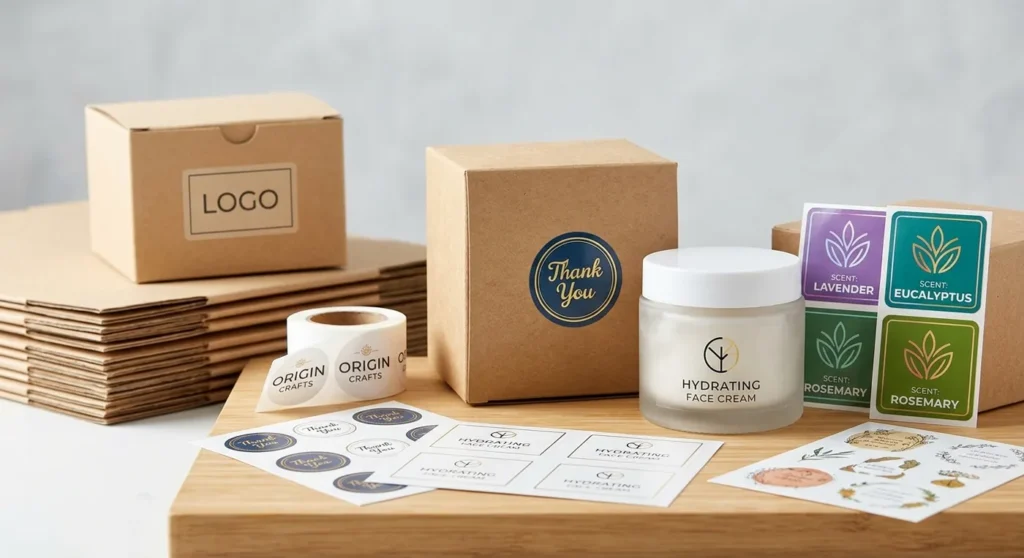
Packaging stickers can serve as logo labels, seals, thank you stickers or product identifiers.
A sticker closing tissue paper does not need the same material performance as a product label on a refrigerated item.
Define where the sticker will be used before selecting stock and adhesive.
For paperboard product cartons, a logo sticker can be an affordable bridge between plain stock packaging and fully printed boxes.
A business can buy one standard carton and change labels for different scents, flavors or product variations. This reduce inventory needs and makes early packaging easier to manage.
DIY Packaging Labels for Small Business
DIY labels are useful when a company is still testing products.
Instead of buying 5,000 printed cartons for five different product varieties, one might buy 500 plain cartons and create smaller batches of labels.
That provides flexibility if the product name, ingredients or branding changes.
The tradeoff is labor. Someone has to print, cut and apply those labels.
Track that time.
If a worker spends one minute preparing and applying every label, 1,000 products require more than 16 hours of labor just for that task. At some point commercial label printing starts looking a lot cheaper.
How to Make Shipping Labels
Shipping labels work differently from decorative packaging labels.
Normally, you create a shipment through your carrier, ecommerce marketplace or shipping software. The system produces the shipping label using the destination, package information and purchased service.
US businesses commonly work with carriers such as:
- USPS
- UPS
- FedEx
Marketplaces and ecommerce platforms such as eBay, Etsy and Shopify can support shipping label workflows too. The supplied research shows strong interest in creating and printing labels across USPS, UPS, FedEx, eBay, Etsy and Shopify. Pasted text
How to Make Shipping Labels at Home
You do not necessarily need special commercial equipment.
A normal printer can print many shipping labels on ordinary paper. The printed label can then be attached securely according to carrier requirements.
Adhesive shipping label sheets make the process faster.
Businesses processing more shipments may prefer a thermal label printer. Thermal printing avoids traditional ink cartridges and is widely used for shipping workflows.
The keyword research includes home printing with standard printers, HP printers and thermal printers, reflecting the different setups small sellers use. Pasted text
How to Make Shipping Labels for Small Business
For occasional shipments, creating each shipment individually may be enough.
As order volume increases, connect your order management or ecommerce platform with the shipping process where appropriate. This reduces repetitive typing and the possibility of entering addresses incorrectly.
A practical shipping label workflow looks like this:
- Receive the customer order
- Pack the correct product
- Weigh the finished parcel
- Measure the box
- Select the shipping service
- Create the carrier label
- Print at the intended size
- Attach it to the parcel
- Verify the tracking information
Do not estimate package weight carelessly. The completed package includes the product, paperboard carton, filler, insert and shipping material.
How to Make USPS Shipping Labels
USPS shipping labels can be created through supported USPS shipping services or compatible third party platforms.
Enter the sender and recipient information, parcel information and shipping service. The resulting label contains the information required for the selected shipment.
USPS services and requirements can change, so check current USPS instructions when creating postage.
The supplied keyword research shows particularly strong interest in USPS label creation, home printing, QR codes and prepaid labels. Pasted text
Making UPS and FedEx Shipping Labels
UPS and FedEx provide their own shipment creation systems. Businesses can enter package and destination details, select a service and produce the appropriate label.
Make sure the parcel dimensions and weight match the package being sent.
Do not redesign carrier generated barcodes or tracking sections to match your branding. Shipping labels are operational documents, and scan reliability is more important than visual style.
Shipping Labels for eBay, Etsy and Shopify
Marketplace sellers can commonly create labels through the platform’s order workflow.
eBay and Etsy sellers should create the label for the correct customer order and verify package information before purchasing postage.
Shopify merchants can use available shipping functions depending on their store setup and location.
Interfaces and supported services can change, so current platform instructions should be followed rather than relying on an old screenshot from a blog post.
How to Print Shipping Labels the Correct Size
Incorrect scaling is one of the most frustrating shipping label problems.
Select the format intended for your printer. Do not randomly shrink a shipping label just to save paper.
Check print settings for unwanted options such as “fit to page” if they alter the intended label dimensions.
Thermal printers commonly use dedicated label formats. Regular printers can use compatible sheets or paper formats.
Print one label and check that all text and machine readable areas are complete before producing a large batch.
Can You Make a Shipping Label by Hand?
You can handwrite addressing information for certain mailing situations, but that is different from recreating a carrier generated prepaid shipping label.
If purchased postage or a particular shipping service requires a generated label, use the label supplied by the carrier or shipping platform.
Do not manually redraw barcodes.
For a small business, generated shipping labels are usually much easier to manage and provide a more consistent process.
How to Print Shipping Labels Without a Printer
People without a home printer may have other options depending on the carrier and shipment.
Some services support QR code based workflows or printing at eligible locations. Office supply and print businesses may offer printing too.
The supplied research includes searches around printing at Staples, Office Depot, post offices and shipping labels without a printer. Pasted text
Check the current carrier instructions before leaving home since printing options vary by service and location.
Where to Get Packaging Labels Printed
Once home production becomes inefficient, move to a commercial label printer.
Local commercial printers may produce sheet or roll labels. Online label companies can provide custom shapes, materials and quantities.
Ask about:
- Label dimensions
- Paper or film material
- Adhesive
- Surface finish
- Quantity
- Roll direction
- Core size
- Printing method
- Application method
- Production time
If labels will be applied by machine rather than by hand, roll direction and construction become particularly important.
Why Packaging and Labeling Matter
Packaging contains and presents the product. Labels communicate information.
For a small business, the two should be planned together.
A label that covers a carton opening can interfere with use. A tiny label on a huge panel can look accidental. A beautiful label with unreadable product information creates another problem.
Treat the label as part of the paperboard packaging system from the beginning.
This can save material too. A company may use the same stock carton across several product variations and differentiate them through labels rather than maintaining a separate printed carton inventory for every variation.
Common Packaging Label Mistakes
A few problems appear very often:
- Designing before measuring the box
- Using text that is too small
- Choosing an unsuitable adhesive
- Printing hundreds before testing one
- Applying labels across awkward folds
- Forgetting required product information
- Using poor contrast
- Distorting barcodes
- Printing shipping labels at the wrong scale
- Using label material that does not suit the package surface
Most of these can be found with a single physical prototype.
Print it, apply it and handle the package like a customer would.
From DIY Labels to Commercial Production
Learning how to make packaging labels begins with measuring the package and deciding what the label actually needs to do. Product labels communicate branding and product information. Shipping labels help parcels reach customers. They should not be treated as the same thing.
A small business can start with label sheets and a regular printer, then use a Cricut or other cutting system for special shapes. As orders increase, commercially printed roll labels can reduce manual work and improve consistency.
For paperboard packaging, test every label on the actual carton. Check adhesion, readability, size and placement. Then print the quantity you need. It is a simple workflow, maybe a little boring, but getting these basics right can prevent an awful lot of wasted labels and boxes.
Frequently Asked Questions About Packaging Labels
How can I make my own packaging labels?
Measure the available package area, create artwork at the correct size, select suitable adhesive label material, print a test and apply it to the actual packaging before producing the full quantity.
Can I print product labels at home?
Yes. Inkjet and laser printers can print compatible label sheets. Make sure your label material matches the printer type.
What is the best label for paperboard packaging?
The best material depends on the board surface, storage conditions and product. Test the adhesive on the actual carton before ordering large quantities.
Can I use Canva to make packaging labels?
Canva can be used to create basic label artwork. Set the design to the correct dimensions and check the commercial printer’s file requirements before ordering.
Can I use a Cricut for product labels?
Yes. Cricut machines can be useful for small quantities and custom cut shapes. Commercial printing tends to become more practical as volume increases.
How do I make shipping labels for my business?
Create the shipment through the carrier, marketplace or compatible shipping platform, enter accurate package information, purchase the service and print the generated label.
Do I need a thermal printer?
No. Many small businesses start with a regular printer. Thermal printers become convenient when shipping volume increases.
Where can I get product labels printed?
Commercial printers, specialized label companies and online printing services can produce product labels. Ask about material, adhesive, quantity and finishing before ordering.